Chapter 12 The EvoLudo code
12.1 Quick start
Start exploring the fascinating world of evolutionary dynamics and spatio-temporal patterns by setting up your own EvoLudo development environment in a few easy steps:
-
1.
Make sure that maven (see https://maven.apache.org), java (version or better, see https://openjdk.org) and git (see https://git-scm.com/downloads) are installed on your system. If not, download the free software from the respective sites and follow their installation instructions.
. . Note: The recommended alternative is to use a package manager like macports and run ’port install git maven3’ followed by ’port select maven maven3’ (see https://www.macports.org) or with homebrew run ’brew install git maven’ (see https://brew.sh). In both cases the package manager also installs the latest java version, if needed, as a dependency of maven. . -
2.
Download the EvoLudo source code from GitHub by visiting https://github.com/evoludolab/EvoLudo. Click Code and then Open with GitHub Desktop or download and extract the ZIP file.
. . Note: The recommended alternative is to clone the repository by executing ’git clone https://github.com/evoludolab/EvoLudo’ in the terminal. This creates a directory EvoLudo in the current working directory and requires approximately MB of disk space. . -
3.
Open a terminal and navigate to the EvoLudo root directory. Execute ’mvn clean’ to reset your EvoLudo development environment. When first run, this downloads and installs all required software dependencies from remote repositories as well as those provided by EvoLudo into your local maven repository and may take a while to complete. Only required during the initial setup.
-
4.
Compile all components of the EvoLudo project with ’mvn clean install’.
-
5.
Execute ’mvn gwt:devmode’ to launch a local Jetty (see https://github.com/jetty) web server.
. . Note: All warnings in the terminal are issued by Jetty. They can be safely ignored. However, Jetty should exclusively be used for development and never for deployment. . -
6.
Click Launch Default Browser and try out the different EvoLudo modules.
12.2 Running simulations
12.2.1 Web browser
The JavaScript code produced by the GWT compiler with the command ’mvn install’ in section 12.1: Quick start runs in any web browser and is hence ideally suited for visualizing the dynamics, illustrating the evolutionary process and inviting further explorations.
12.2.2 Command line
For more serious simulations, execution speed is of the essence and that’s where JavaScript is lacking. Fortunately, EvoLudo is written in Java and hence can be compiled and run as a regular java application. In fact, the command ’mvn install’ in section 12.1: Quick start also creates an executable jar-archive in ./EvoLudoJRE/target/EvoLudo.<version>.jar. The jar-archive is a self-contained executable file that includes all the necessary libraries and resources. It can be copied to any location and executed without any further dependencies and accepts all the settings as command line options.
All settings that are passed to the web version of EvoLudo can also be passed to the jar-archive as command line options. In addition, the jar-archive offers a number of options to control simulations that are not available when running in the browser. For a complete list see section 11.2.5: Simulation options or execute ’java -jar EvoLudo.<version>.jar --help’ in the terminal. By default, EvoLudo.<version>.jar runs in headless mode (without GUI) and writes all output to the terminal. The option --gui launches EvoLudo.<version>.jar as a legacy Java application. For example, try ’java -jar EvoLudo.<version>.jar --module 2x2 --gui --geometry R4’ to launch an old-fashioned Java application GUI for a game on a random graph with average degree .
| . | . | Important: The Java GUI is still maintained but no longer under active development. Instead, for visualizations, the more feature rich and flexible GWT user interface running in any web browser is recommended. The only exception is when running PDE models. In Java those calculations take advantage of parallel execution on multicore processors, which is currently not available for JavaScript. As an impressive example, compare the speed at which spatio-temporal chaos develops with JavaScript in the browser or the Java GUI using the settings: --module ePGG --model PDE --colors red;green;black --cost 1.0 --deathrate 1.2 --delay 100 --dt 0.1 --fitnessmap static 1,1 --geometry nf --groupsize 8 --init circle 1,1,8 --interest 2.34 --pdeD 2,1 --pdeL 200 --pdeN 101x --timestep 1 --run, which reproduces Fig. 1.6. Don’t forget to include the option --gui when running EvoLudo.<version>.jar in the terminal. | . |
The headless mode is particularly useful to run (parallel) simulations in the background or for batch processing. It is not unusual that some extended studies require days or weeks to complete.
12.2.3 Highlights
-
1.
Reproducible simulations using the command line option --seed[=<seed>] where <seed> is an arbitrary integer number (defaults to zero). For examples, compare Exercise 13.18 and Exercise 13.19 in section 13.12.2: The --export option or Exercise 13.20 in section 13.12.3: The panic file.
-
2.
The GWT application produces identical output as the java simulations. In fact, the state of any EvoLudo module/model can be exported in one framework and continued in the other again with identical results. For an example compare the output of Exercise 13.5 in section 13.7: Adding statistics modes and Exercise 13.17 in section 13.12.1: The --data option.
-
3.
Prepare for the unexpected: if simulations get inadvertently killed, a panic-<date>.plist file is generated with the <date> replaced by the date and time of the shutdown. The file contains the state of the simulation before it was shutdown and hopefully allows to recover some work that has already been accomplished. For an example, see Exercise 13.20 in section 13.12.3: The panic file.
12.3 Setting up the development environment
With the steps in the previous section 12.1: Quick start, everything is already setup for development too. This section covers a few more tips to get started for adding your own bells and whistles to EvoLudo. The GWT DevMode is a very convenient and powerful tool to rapidly develop, test and debug not only new EvoLudo modules but also to improve and extend the core EvoLudo functionality. The JavaScript code produced by the GWT compiler runs in any web browser and is hence ideally suited for visualizing the dynamics, illustrating the evolutionary process and inviting further explorations.
-
1.
The configuration files in the EvoLudo repository are designed to support development using VS Code (see https://code.visualstudio.com) but should be easy to adjust to your favourite IDE.
. . Note: For VS Code installing the Java Extension Pack by Microsoft (see https://marketplace.visualstudio.com/items?itemName=vscjava.vscode-java-pack) is highly recommended. . -
2.
When executing ’mvn clean install’ (or simply ’mvn install’) the java code is not only compiled into a JAR archive but also translated into JavaScript code using the GWT toolkit (see https://www.gwtproject.org).
-
3.
A development server is then launched with ’mvn gwt:devmode’ listening on port 8888 of localhost. Unsurprisingly localhost is only reachable from the local machine. In addition, on port 9876 listens the source map provider, which links the compiled and obfuscated JavaScript code to the actual source code files.
. . Important: In order to test the EvoLudo web application on another device (for example to test touch features on a tablet), add the option ’-Devoludo.server=<server>’ to the command line where <server> is the DNS name or IP address of the machine that runs the development server. Now the server is reachable from the outside world at http://<server>:8888/<yourfile>.html. . -
4.
Open your favourite web browser and navigate to http://localhost:8888/EvoLudo.html. This displays the EvoLudo web application. The application is compiled on the fly. The first compilation takes a little longer but subsequent compilations are much faster.
-
5.
The preferred way is to open the Run and debug tab in VS Code and launch the GWT EvoLudo (localhost) configuration. This launches the Google Chrome browser and connects to the Jetty server running on localhost.
. . Note: The configuration can be adjusted by clicking Add configuration… to edit launch.json accordingly. . -
6.
Multiple modes of development are available and listed below with increasing complexity:
- Quick and dirty:
-
Make your changes to the source code and simply reload the page in the browser. This triggers the recompilation of the code as needed and immediately displays the result. Naturally, compilation fails if the changes include errors, but almost all potential problems are already highlighted in VS Code. In case the compilation fails, the browser displays an error message with a link that opens a new tab containing the full error message and stack trace, see Fig. 12.1.
- Provide some feedback (GWT only):
-
Add GWT.log(String) lines to the code to print out whatever is of interest. The output is displayed in the debug console of VS Code as well as in the browser console (Cmd-Alt-C on the Mac).
. . Note: The GWT.log(String) method is a GWT specific method, which means it can be used in code that is translated into JavaScript code but attempts to compile it as java code will fail. . - Provide some feedback (JRE only):
-
Add System.out.println(String) lines to the code to print out whatever is of interest. The output is displayed in the terminal.
. . Note: In GWT the command System.out.println(String) has no effect but at least does not result in compilation failures. . - Provide some feedback (GWT & JRE):
-
Numerous classes include a logger field, which provides a GWT and JRE agnostic implementation of a logging system. Through methods, including logger.info(String), logger.warning(String), and logger.severe(String), messages of increasing severity are logged to the consoles of VS Code and the browser or the terminal. Moreover, all messages are also written to the Console log view of the EvoLudo web application. The logging system can also be used to display intermediate results or debugging information. For more information on logging in java in general see https://docs.oracle.com/en/java/javase/11/docs/api/java.logging/java/util/logging/Logger.html, and in GWT, in particular, https://www.gwtproject.org/doc/latest/DevGuideLogging.html.
- Step-by-step debugging (for VS Code):
-
Select the Run and debug tab in VS Code and choose GWT EvoLudo (localhost) target, which launches Google Chrome (see item 5 above). Using GWT.log(String) etc. continues to work, but the result is also shown in the console of VS Code. However, now it is also possible to set breakpoints in VS Code and do all the step-by-step fun stuff of debugging.
. . Note: The VS Code debugger for GWT code is actually quite amazing (and simple) considering that the browser is running JavaScript but the breakpoints and step-by-step execution is in the java source file. Almost magically this even works for obfuscated JavaScript code that is completely unreadable by itself! . After making changes to the code, simply reload the web page and the changes are ready for testing.
-
7.
The debug targets in VS Code not only support step-by-step debugging of GWT code but also of traditional java code. More specifically, the different JRE … debug targets launch the EvoLudoLab.java (in the maven module EvoLudoJRE) with the corresponding set of options (as specified in launch.json). Depending on the options provided, the code runs in the terminal or as an old-fashioned java application with a GUI. Most notably, the java code is multithreaded, which prevents the GUI from potentially becoming unresponsive and is leveraged for a tremendous speed increase through parallel processing for PDE models.
-
8.
It is recommended to use the web interface as much as possible during development because of the rapid workflow.
. . Important: Always keep in mind that the shared java code in the EvoLudoCore module must be agnostic to special features of GWT or of JRE. GWT specific code resides in the EvoLudoGWT module while JRE specific variants are in the EvoLudoJRE module. . -
9.
The API documentation for the EvoLudo simulation toolkit is automatically generated from the source files by executing ’mvn javadoc:aggregate’ and placed in docs/api. Documentation of the latest tagged version is available at
https://www.evoludo.org/docs/api. -
10.
A number of useful shell scripts are located in the script folder. Most notably, builddist.sh builds all maven modules, runs consistency tests and if they all pass assembles all parts of the EvoLudo toolkit in the dist folder (including the GWT web application, the java application, and the API documentation).
12.4 Troubleshooting
This section briefly reviews and discusses the most common causes of problems with the development environment and how to resolve them.
12.4.1 JavaScript versus Java
All code in the maven module EvoLudoCore is shared by both the GWT and JRE environments and must be agnostic of the specific features of GWT or JRE. GWT produces JavaScript code, but JavaScript code is much more lenient than JRE and java.
A notorious example is accessing elements of an array outside the allocated range. For example, the following code snippet
is perfectly fine in JavaScript (and GWT). The field b is left undefined and the length of the array a is increased to four. In contrast, in java the code compiles fine but throws an ArrayIndexOutOfBoundsException at runtime and exits. In principle, an exception would be thrown on both the second and third line, but execution never gets to the third.
Some edge cases in numerical evaluations are also handled differently. For example, consider the following code snippet
is perfectly fine in JavaScript (and GWT) and compiles in java. However, java throws an ArithmeticException at runtime for both lines, while JavaScript assigns Infinity to x and NaN to y.
12.4.2 Dealing with coding errors
Most coding errors are already caught and highlighted by the VS Code editor. However, occasionally an error in the code may go unnoticed, which then causes the GWT compiler to fail when reloading the browser window. Instead of the EvoLudo user interface, the Google Chrome browser simply displays an overlay panel with the message failed and a button to Try Again, see Fig. 12.1.
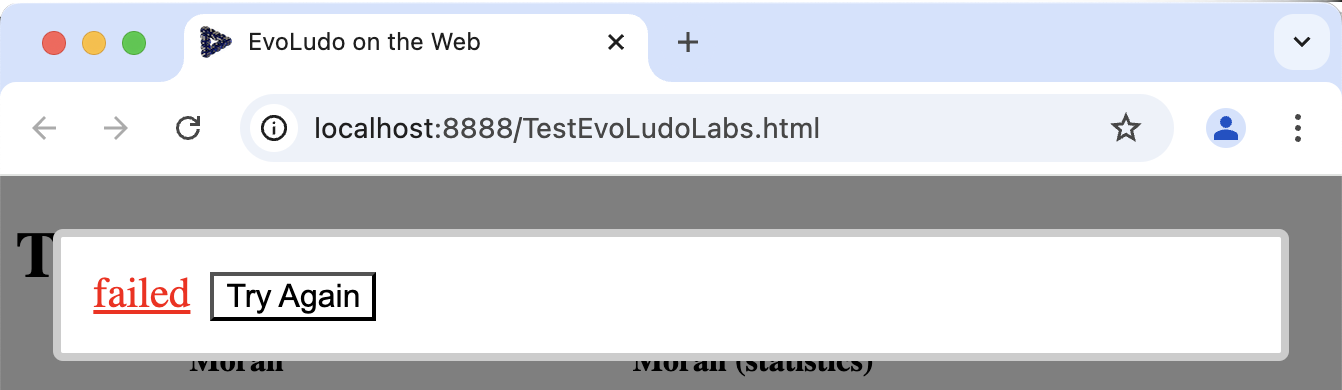
In order to see the actual error, click on the failed message to open another tab with the detailed error message and stack trace. The error message is usually very informative and helps to locate the problem. Once the error in the code is fixed you can click Try Again or reload the browser window once more to see the updated EvoLudo.
12.4.3 Restarting the java language server
Sometimes the java IntelliSense mechanism of VS Code seems to get confused resulting in unreliable code completion or popup info panels. The telltale sign is that the code colouring in the VS Code editor is off. This is easily fixed by the command Java: Restart Java Language Server (Cmd-Shift-P and start typing).
12.4.4 Restarting the DevMode server
Occasionally it may happen that the development environment no longer works as expected. In those rare cases it is necessary to quit the GWT DevMode server and run ’mvn clean install gwt:devmode’ to clean the workspace, recompile the code and start the GWT DevMode server again. Usually it is not necessary to also re-start the debugging session and with it the Google Chrome browser.
By default, the DevMode server listens on port for http-requests and runs the code server on port . Shutting down the DevMode server can sometimes take surprisingly long and may require some patience. As long as the server is not fully shutdown, the port remains in use for the code server and prevents another instance of the server from starting because access to the port is blocked.
| . | . | Note: The problem with the code server blocking port is less likely to occur when quitting the DevMode java application rather than killing the ’mvn gwt:devmode’ process by pressing Ctrl+C in the terminal. | . |
More specifically, trying to re-start the DevMode using ’mvn gwt:devmode’ fails with an error similar to
but to locate the actual cause, it is necessary to scroll up past a long stack trace to find:
indicating that port is already (or still) in use. Usually you can simply wait and try again. If that doesn’t help, resetting the development environment will do the trick, see section 12.4.6: Reset the development environment below.
12.4.5 Color cannot be resolved
The most frequent and unmistakable sign of trouble is that unexpectedly GWT compilation fails when reloading the browser window. When clicking on failed to display the cause for the error, the first error is
followed by a seemingly never ending cascade of errors. This includes a variety of different errors, but the following two are the most frequent:
Presumably the cause for the error is that the database underlying the sophisticated incremental building of GWT projects gets out of sync.
As a consequence, recompiling the GWT code by reloading the browser window fails. Quitting and re-starting the DevMode server as outlined above usually resolves the issue.
| . | . | Note: The java.awt package is not available in the GWT environment. However, a GWT friendly implementation of java.awt.Color class is provided in the EvoLudo code through GWT’s super-source mechanism (see classes in directory EvoLudoGWT/src/main/super). | . |
12.4.6 Reset the development environment
As a last resort, reset the development environment by quitting the VS Code workspace, which also closes any Google Chrome browser windows from debugging sessions. If the DevMode server is running, shut it down by quitting the DevMode java application. Then, execute ’mvn clean’, ’mvn install’, sequentially and re-launch the DevMode with ’mvn gwt:devmode’. Finally, re-open the VS Code workspace and re-launch the debugging session, which also re-opens the Google Chrome browser. Now everything should be back in a sane state.
12.5 Code structure
This section provides a brief overview of the organization of the EvoLudo code.
12.5.1 maven modules
The EvoLudo project consists of six maven modules:
- EvoLudoCore:
-
The core java code of EvoLudo shared by GWT as well as JRE. This is the backend that deals with the numerical integration of differential equations (ordinary, stochastic, or partial) as well as individual based simulation and must be agnostic of GWT or JRE specifics.
- EvoLudoGWT:
-
The GWT specific code of EvoLudo. Most notably this includes all the GUI components for visualizations in the web browser as well as handling the asynchronous scheduling of tasks in the browser. This also handles the Jetty server for development using a web browser and includes the .(x)html files for loading the GWT application.
- EvoLudoJRE:
-
The JRE specific code of EvoLudo. This provides the basis for generic as well as customized java simulations. More specifically, in contrast to GWT, JRE can handle multiple threads, which provides a significant performance boost for PDE models and maintains a responsive GUI. In addition, this module also includes GUI components when running as an old-fashioned java application.
. . Important: At this point the java GUI components are maintained but are no longer under active development in favour of the GWT counterpart, which is also significantly richer in features. . - EvoLudoSims:
-
Handles customized java simulations. The simulations are kept in EvoLudoSims/src/main/org/evoludo/simulator/exec/. By default, the simTBT.jar executable is generated. Other executable can be generated using the option ’-Devoludo.sim=<simulation>’ where <simulation> denotes the class name of the simulation.
- EvoLudoTest:
-
Test suite for the different EvoLudo modules in EvoLudoCore/src/main/java/org/evoludo/simulator/modules (not to be confused with the maven modules). Tests are performed by executing the script ./scripts/runtests.sh in the EvoLudo root directory. All tests must always pass (see section 12.11: Advanced: EvoLudo tests).
12.5.2 Java packages, classes & interfaces
java code is organized in packages, classes and interfaces. The most important unit is a class. Each class is defined in a file with the same name as the class and the extension .java. Every class inherits features from a superclass, which is either explicitly specified using the keyword extends, or implicitly extends the Object class. The class contains constructors, fields, methods, and nested classes. Constructors are methods that initialize objects and return a new instance of a class. Fields are variables that store data. Methods are functions that perform operations. Nested (or inner) classes are classes defined within other classes. An inner class can access the fields and methods of the outer class and hence it cannot be instantiated without an instance of the outer class.
All fields and methods have four different visibilities: private, protected, public, or package-private (no keyword). The visibility determines whether the field or method can be accessed from other classes and from which ones. private restricts access to the class, package-private allows access from subclasses in the same package, while protected allows access from any subclass, and public allows access from any class. The access restrictions are summarized in Table 12.1.
| Modifier | Class | Package | Subclass | World |
|---|---|---|---|---|
| public | ✓ | ✓ | ✓ | ✓ |
| protected | ✓ | ✓ | ✓ | ✗ |
| no modifier (package private) | ✓ | ✓ | ✗ | ✗ |
| private | ✓ | ✗ | ✗ | ✗ |
The keyword static makes a field or method belong to the class rather than to an instance of the class. When applied to an inner class the static inner class can be instantiated on its own – without an instance of the outer class. As a consequence, a static inner class cannot directly access the fields and methods of the outer class (apart from static ones).
The keyword final prevents fields from being modified, methods from being overridden, and classes from being subclassed. The keyword abstract indicates that a class or method is incomplete and must be implemented by a subclass.
Interfaces are similar to classes but only contain method signatures, constants and nested interfaces. Method signatures in interfaces may provide default implementations of the methods, marked by the keyword default. A class can only inherit from one superclass but may implement multiple interfaces, listed after the keyword implements.
All classes are organized in packages. The package of a class is specified as the first line of code in a class, for example package org.evoludo.simulator.modules;. The package name actually doubles as a path to the location of the class file starting at the src folder of the java code. That is, a class in the aforementioned package must reside in the folder src/org/evoludo/simulator/modules.
12.6 EvoLudo modules
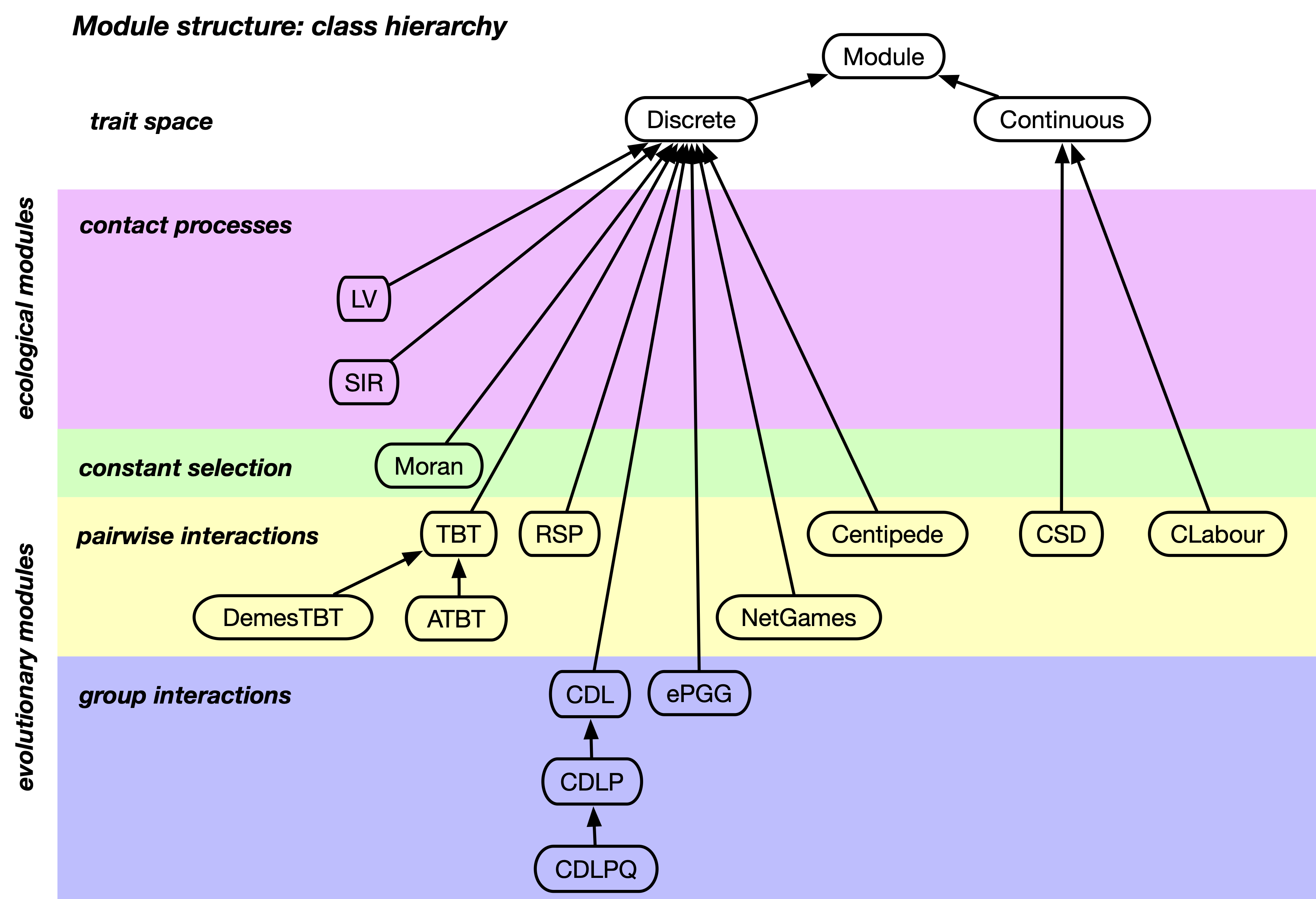
Each module represents an implementation of a specific evolutionary scenario. Depending on the underlying trait (strategy) set each module extends either the Discrete or the Continuous class. The currently available modules with discrete traits are:
- Moran:
-
The classic Moran process with constant selection.
- TBT:
-
The classic games modelling interactions between pairs with two strategies.
- ATBT:
-
An extension of the TBT module to include asymmetric games and environmental feedback.
- RSP:
-
The classic Rock-Scissors-Paper game with cyclical dominance of strategies.
- CDL:
-
The public goods game in groups of arbitrary size with voluntary participation.
- CDLP:
-
An extension of the CDL module to include peer punishment.
- CDLPQ:
-
An extension of the CDLP module to include peer punishment and quality control.
- CP:
-
The classic Centipede game for sequential cooperation and challenges to the notion of rationality through backwards induction.
- SIR:
-
The classic epidemiological model with Susceptible, Infected, Recovered individuals.
- Demes2x2:
-
games in deme structured populations with migration between demes.
- ePGG:
-
Ecological public goods games with varying population densities.
- NG:
-
Network games where the interactions between individuals encode the ephemeral population structure.
The currently available modules with continuous traits are:
- cSD:
-
The continuous snowdrift game.
- cLabour:
-
The division of labour in a continuous trait space.
The organization of the modules is visualized in Fig. 12.2.
12.7 EvoLudo models
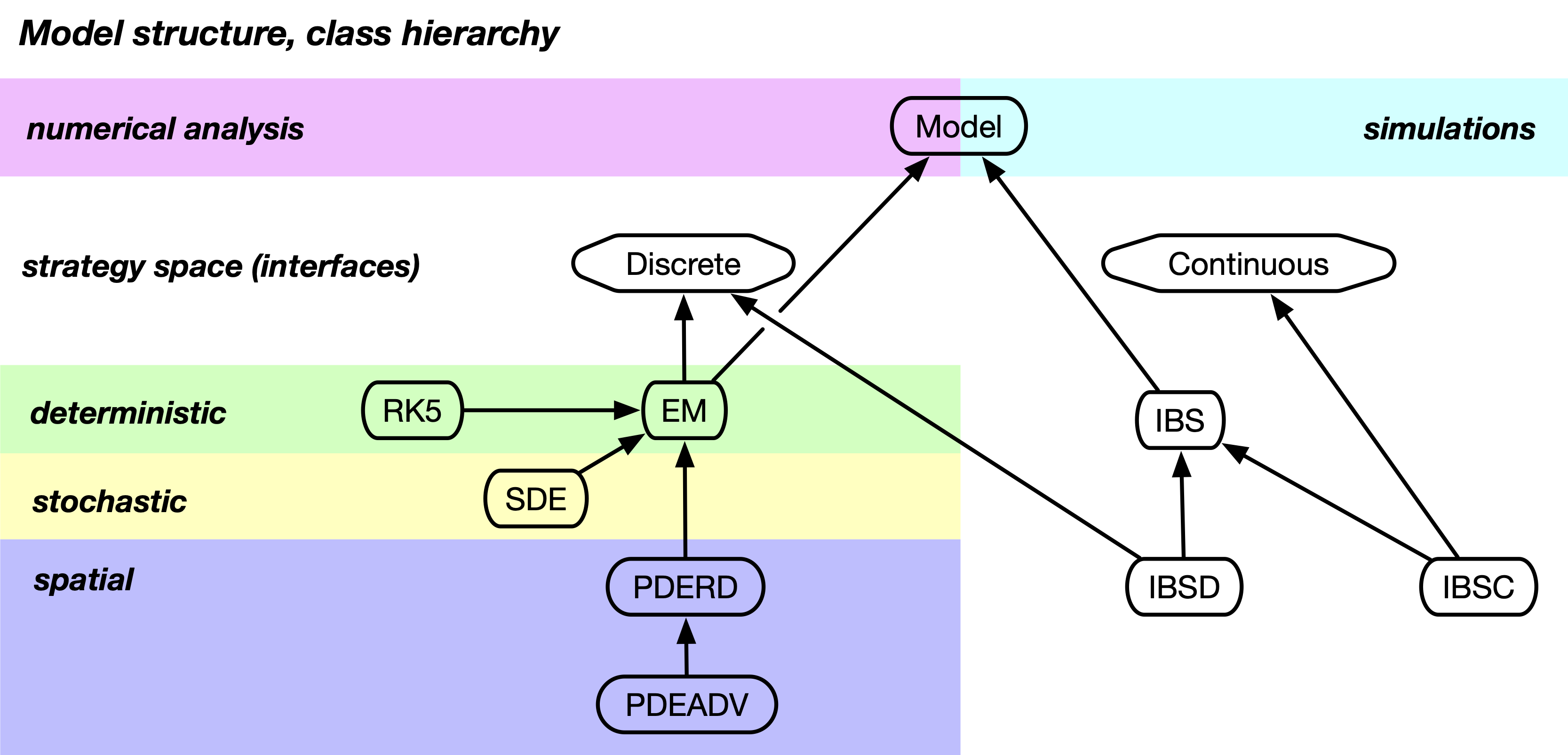
The EvoLudo framework provides implementations for different types of modelling techniques:
- ODE:
-
The classic deterministic dynamics of ordinary differential equations to describe the frequencies or densities of different traits in an infinite population.
- SDE:
-
Stochastic differential equations to describe trajectories of frequencies of different traits in finite populations due to demographic fluctuations.
- PDE:
-
Partial differential equations to describe the deterministic dynamics of the changing spatial distribution of different traits in a population.
- IBS:
-
Individual based simulations to mimic the evolutionary process by tracking the fate of individuals in a population.
The hierarchical structure of the models is visualized in Fig. 12.3.
12.8 EvoLudo modes
12.9 EvoLudo engine
12.10 EvoLudo events
12.10.1 Milestone listeners
All modules implement the MilestoneListener interface and are notified of the following events:
- moduleLoaded():
-
Called after the EvoLudo module finished loading.
- moduleUnloaded():
-
Called after the EvoLudo module has unloaded.
- moduleRestored():
-
Called after the state of the EvoLudo module has been restored.
- modelLoaded():
-
Called after EvoLudo model finished loading.
- modelUnloaded():
-
Called after the EvoLudo model has unloaded.
- modelRunning():
-
Called before the EvoLudo model starts running.
- modelRelaxed():
-
Called after the initial configuration has relaxed.
- modelStopped():
-
Called after a running EvoLudo model stopped because the model converged (or reached an absorbing state). Not called when the model is stopped by the user (through the GUI).
- modelSettings():
-
Called after the settings of the EvoLudo model have changed. If the changes required resetting the model, modelDidReset() is called instead.
- modelDidInit():
-
Called after the EvoLudo model got re-initialized. Initialization generates a new initial configuration, i.e. trait distribution, but does not regenerate the geometry of the population.
- modelDidReset():
-
Called after the EvoLudo model was reset. Resetting the model first re-generates the geometry of the population and then generates a new initial configuration. For fixed population geometries, for example lattices, resetting and initializing the model are equivalent. This is not the case for geometries that include a random element, for example random regular graphs.
Overriding any of the methods is optional.
12.10.2 Change listeners
In contrast to the milestone events, modules are not notified of change events by default. Modules that wish to be informed about all state changes of the EvoLudo model need to explicitly implement the ChangeListener interface. This requires implementing the method modelChanged(PendingAction action). After every state change of the model, the modelChanged(...) method is called. Such a state change can be triggered by user actions through the GUI or by the model itself. A running model calls modelChanged(...) every time an update is available. The frequency of those calls depends on the --timestep settings. The reason and type of state change is given by the PendingAction argument. It’s called a pending action item because any running model may not immediately attend to external request. A ChangeListener may decide to process any or all of the following actions:
- NONE:
-
State changed. No action requested.
- SHUTDOWN:
-
Unload EvoLudo. Stop running models and initiate clean shutdown of the EvoLudo engine when the GWT application gets unloaded.
- RESET:
-
Reset model. Stop running models, re-initialize geometry and strategies.
- INIT:
-
Initialize model. Stop running models and re-initialize strategies.
- STOP:
-
Stop running models.
- CHANGE_MODE:
-
Change execution mode of model.
- STATISTIC_READY:
-
Statistics sample is ready.
- STATISTIC_FAILED:
-
Statistics sample has failed.
Any of these actions can be requested by calling the method requestAction(PendingAction action) of the EvoLudo engine, see section 12.9: EvoLudo engine.
12.11 Advanced: EvoLudo tests
EvoLudo provides an extensive set of tests to ensure consistency and reproducibility of simulation results. This also helps to prevent unexpected or unintended side effects due to changes to the EvoLudo code. In principle, all tests should always pass on the main branch, but this is not guaranteed. However, starting with v1.3.1 all tests must pass for each tagged commit or the subsequent one. Either one of those commits may include updated tests (if necessary). The tests are run by executing the script ./scripts/runtests.sh in the EvoLudo root directory.
There are three main reasons that tests may legitimately fail:
-
1.
Changing option names or the parsing of command line options may cause one or several module tests to fail. In that case the clo-files for generating tests in EvoLudoTest/tests/generators/ need to be updated.
-
2.
Fundamental changes (extensions or bug fixes) to the EvoLudo models may cause the tests of those models to fail. If the result is intended, especially when fixing bugs, the corresponding tests need to be updated by running ./scripts/generatetests.sh in the EvoLudo root directory.
-
3.
Unfortunately tests may also fail when comparing the java output between architectures. In particular, the set of tests on GitHub are generated on an Apple Silicon processor (Mac Studio 2023, Apple M2 Max). Many tests fail when testing, for example, on an Intel processor (MacBook Pro, 13” 2019, Four Thunderbolt 3 port with 2.8GHz Quad Core i7). The reasons are subtle differences in the software implementations. For more detailed information, consult the EvoLudoTest/README.md file.
| . | . | Attention: In case some EvoLudo tests happen to fail on your platform, a new set of reference tests needs to be generated by running the script ./scripts/generatetests.sh prior to making any changes to the source code. | . |
In case of failing tests, the changes must be carefully checked and, once identified and verified as a legitimate failure, a new set of tests needs to be generated.
12.12 Acknowledgements
EvoLudo relies on several other open source projects:
- MersenneTwister:
-
A fast pseudo random number generator with a period of by Makoto Matsumoto and Takuji Nishimura (see http://www.math.sci.hiroshima-u.ac.jp/~m-mat/MT/emt.html) and, more specifically, the java port by Jean Luke (see https://cs.gmu.edu/~sean/research/) with further adaptations to make it GWT compliant.
- Parallax:
-
A cross-platform Java 3D SDK by Alex Usachev (see https://thothbot.github.io, version 1.6) for the 3D rendering of population structures using WebGL. This includes stereoscopic and anaglyph projections of the population structures in real 3D. Get your red-cyan glasses out and go explore (accessible through the context menu).
- Canvas2Svg.js
-
A JavaScript library by Gliffy Inc. https://www.gliffy.com to export and save HTML canvas graphics as SVG (see https://gliffy.github.io/canvas2svg/).
A big thank you to the respective researchers and developers.